ButtWyperVyper
New Member
Hello Everyone!
This is my first post here, so apologies if I miss any rules.
I'm posting because I feel I have a misunderstanding of all the factors that contribute to smooth playback within Resolve and would love any pointers anyone may have.
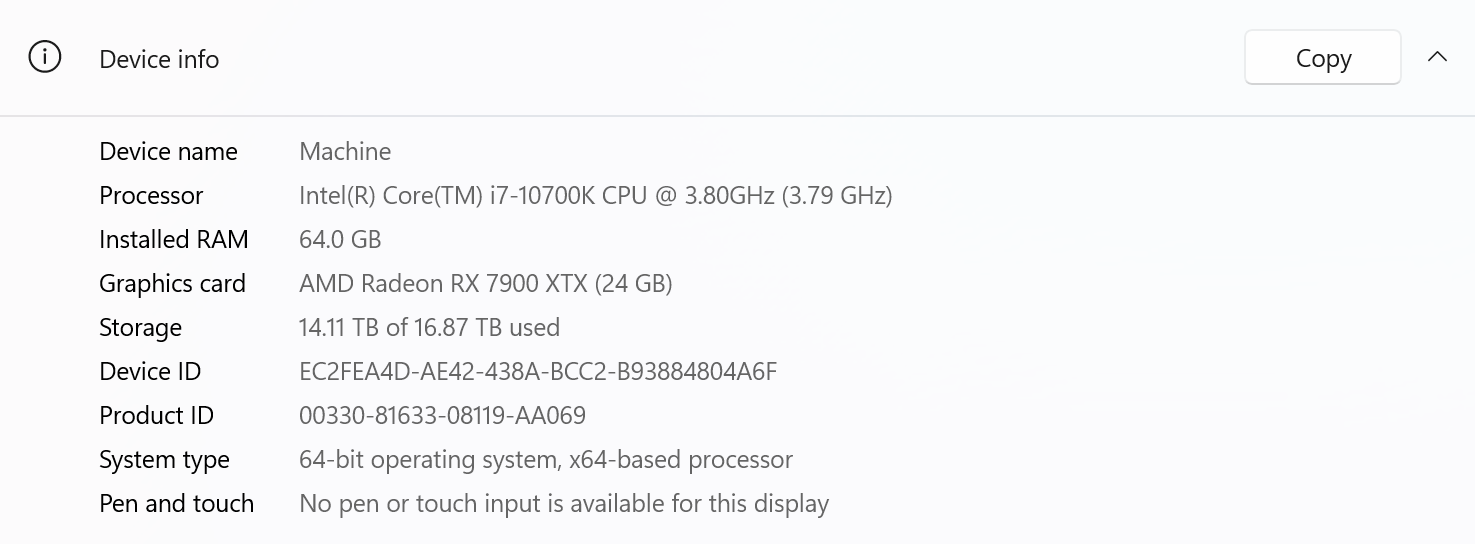
You see, I recently built my first PC with the intention of it functioning as an editing/color grading machine, however the performance I've gotten out of it so far hasn't been as stellar as I thought it would be. I've posted my specs below.
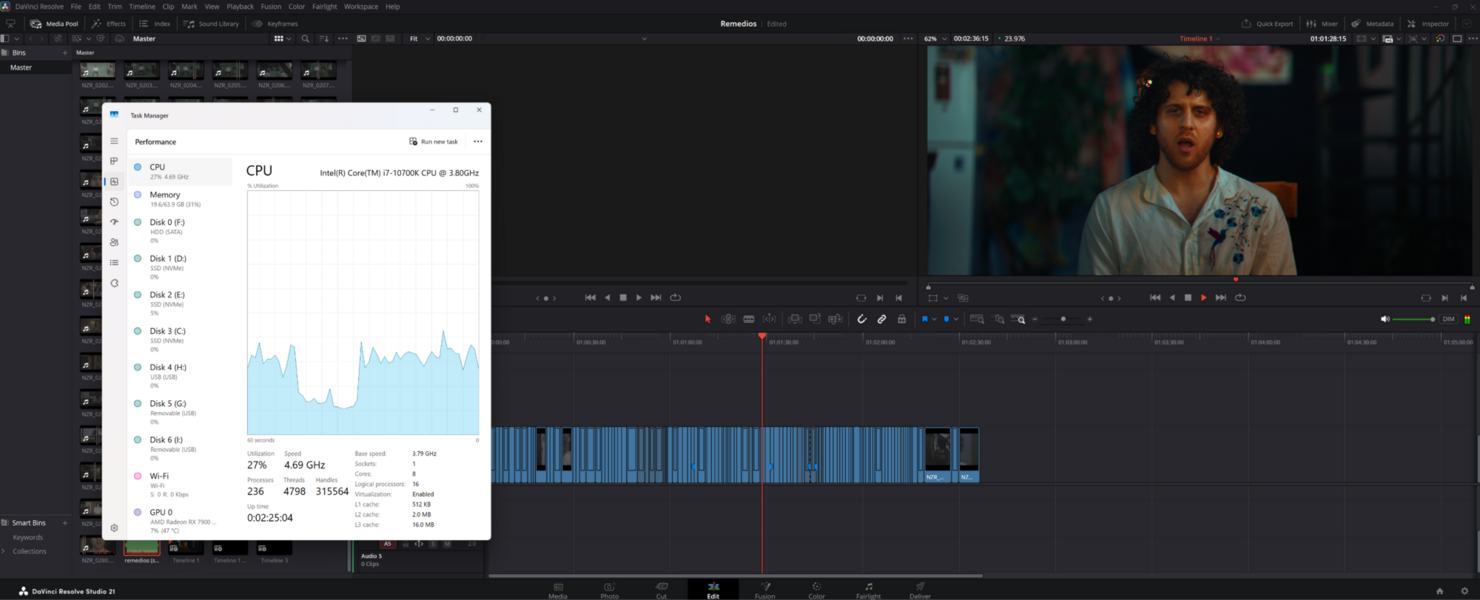
My understanding was that video playback was mostly tied to the GPU. Therefore, when building the PC, I prioritized a graphics card that I felt would be more than capable (based on the research I did). Yet, when testing, I am still not able to get smooth playback at the highest settings. In fact, my performance isn't substantially better than it was on my old machine (I upgraded from a NIVIDIA 360ti, for reference). I can get smooth playback when I adjust the RAW Decoding down to "Quarter Res. Good," but the intention was the build a machine that would allow me to play my footage back at the highest settings possible. Most confusingly, when checking my Performance within Task Manager, I am not seeing any meaningful bottlenecks. My GPU, CPU, and memory usage all seem to be relatively far from topped out. Infact, my CPU usage is higher when I drop my Decoding settings down to Quarter Res. Good.
I have also posted screenshots of my Performance window when playing back at various Decoding qualities
I purposefully left my CPU un-upgraded, as my understanding was that the GPU was the underpowered part of my build, and I wasn't seeing significant CPU usage withing Task Manager. Is there perhaps something about that I am misunderstanding?
Some things to note from my own testing:
So I guess my question is, what am I missing about RAW video playback that I could change/upgrade/better understand? What would I need to change about my build to get faster playback? Clearly I am missing some piece of the puzzle, and I would love some tips on where to start looking for it.
Thank you for taking the time to read a long post!
This is my first post here, so apologies if I miss any rules.
I'm posting because I feel I have a misunderstanding of all the factors that contribute to smooth playback within Resolve and would love any pointers anyone may have.
You see, I recently built my first PC with the intention of it functioning as an editing/color grading machine, however the performance I've gotten out of it so far hasn't been as stellar as I thought it would be. I've posted my specs below.
My understanding was that video playback was mostly tied to the GPU. Therefore, when building the PC, I prioritized a graphics card that I felt would be more than capable (based on the research I did). Yet, when testing, I am still not able to get smooth playback at the highest settings. In fact, my performance isn't substantially better than it was on my old machine (I upgraded from a NIVIDIA 360ti, for reference). I can get smooth playback when I adjust the RAW Decoding down to "Quarter Res. Good," but the intention was the build a machine that would allow me to play my footage back at the highest settings possible. Most confusingly, when checking my Performance within Task Manager, I am not seeing any meaningful bottlenecks. My GPU, CPU, and memory usage all seem to be relatively far from topped out. Infact, my CPU usage is higher when I drop my Decoding settings down to Quarter Res. Good.
I have also posted screenshots of my Performance window when playing back at various Decoding qualities
I purposefully left my CPU un-upgraded, as my understanding was that the GPU was the underpowered part of my build, and I wasn't seeing significant CPU usage withing Task Manager. Is there perhaps something about that I am misunderstanding?
Some things to note from my own testing:
- Changing the Timeline Playback Resolution doesn't affect my playback speed whatsoever. I can play it back just as fast at Full as I can at Quarter
- The only thing I have found so far that has changed my playback speed is changing the Decoding. At Full Res. Premium I am getting about 17fps. At Half Res. Good I am getting about 21fps.
- Changing "Use GPU for R3D" from "Debayer" to "Decompression And Debayer" doesn't seem to have any significant effect
- On my old computer I noticed a fairly large change in playback speed when I swapped my camera from the OG RED Komodo to the Nikon ZR
- Turning on or off my color grade doesn't seem to have any significant effect on playback
So I guess my question is, what am I missing about RAW video playback that I could change/upgrade/better understand? What would I need to change about my build to get faster playback? Clearly I am missing some piece of the puzzle, and I would love some tips on where to start looking for it.
Thank you for taking the time to read a long post!