
I'm following the first Introduction to Editing tutorial from the DaVinci website.
At ~38 minutes, it tells me to ripple delete video without deleting the linked audio:
1. Select the clip
2. Use the ALT key to select just the video, without selecting the linked audio
3. Use SHIFT-BACKSPACE (PC) to "Ripple Delete".
I am...
1. Selecting the clip
2. Using the ALT key to select just the video, without selecting the linked audio
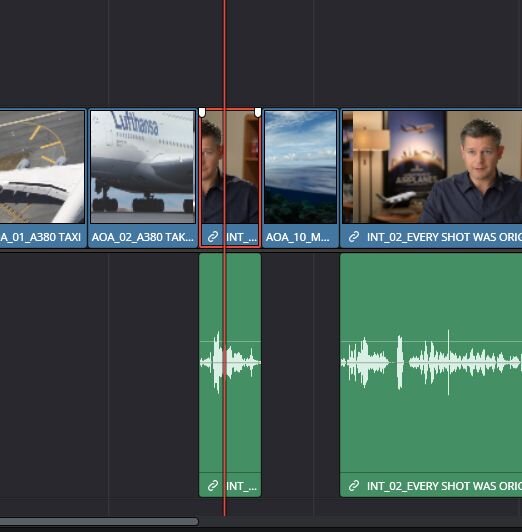
3. Pressing SHIFT-BACKSPACE to Ripple Delete (the video says Shift-Del, but on the PC it seems like Shift-Backspace)

This deletes both the video, AND audio.
I've also tried:
At ~38 minutes, it tells me to ripple delete video without deleting the linked audio:
1. Select the clip
2. Use the ALT key to select just the video, without selecting the linked audio
3. Use SHIFT-BACKSPACE (PC) to "Ripple Delete".
I am...
1. Selecting the clip
2. Using the ALT key to select just the video, without selecting the linked audio
3. Pressing SHIFT-BACKSPACE to Ripple Delete (the video says Shift-Del, but on the PC it seems like Shift-Backspace)
This deletes both the video, AND audio.
I've also tried:
- Ripple Delete via the right-click context menu
- Shift-DEL (does nothing)
- DEL (deletes both)
- Just BACKSPACE (deletes the video, does not ripple)
- "Ripple Cut" (same issue; both with keyboard shortcut and context menu)
- Locking the audio track (this deletes only the video, but desynchs the audio from subsequent clips)
- Toggling "Disable Sync Lock"
- Using the opposite methodology (turning off linking for the full track, then ripple-deleting the video; this still deletes both)
- Closing and re-opening Davinci Resolve and trying the above again
Last edited: