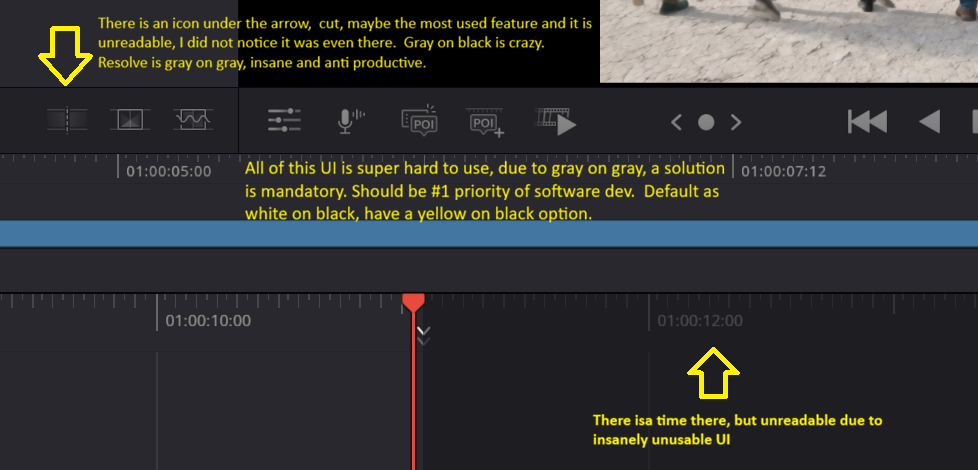
Newbie here and to Resolve but have done video editing on and off for 20 years. I loaded it up, great reviews, with no training, did some minor editing, similar to VideoDirector. Then when I went to try and use the UI it was basically unusable, gray text on gray background. This is discussed on several threads on the Black-- forum.
As someone else has said, they are shocked that anyone can use this product; the UI is so unreadable/unusable. This picture I attached is after I boosted in Preferences from 100% to 150%; that does help but is still terrible, as this image shows. I have worked over 20 years as a software dev manager or the CEO of a software company. This is the most unusable UI I have ever seen; that is saying something, and that is due to just the color scheme of gray text on gray background. They might be able to fix this in 1 day.
What can we do to solve this? I emailed them yesterday. Any phone #? Create a petition? I stopped using the product after 15 mins and am now concentrating on making the product usable. If someone knows where all the buttons are due to trial and error, I guess they can use it. Please look at my image in case it is a special issue, but I think not, due to instruction videos looking similar and forum complaints from many on the same issue. Anyone have a solution? I tried posting, and it was not accepted, maybe copied in posts from other forums, so I have erased them and will try again.
As someone else has said, they are shocked that anyone can use this product; the UI is so unreadable/unusable. This picture I attached is after I boosted in Preferences from 100% to 150%; that does help but is still terrible, as this image shows. I have worked over 20 years as a software dev manager or the CEO of a software company. This is the most unusable UI I have ever seen; that is saying something, and that is due to just the color scheme of gray text on gray background. They might be able to fix this in 1 day.
What can we do to solve this? I emailed them yesterday. Any phone #? Create a petition? I stopped using the product after 15 mins and am now concentrating on making the product usable. If someone knows where all the buttons are due to trial and error, I guess they can use it. Please look at my image in case it is a special issue, but I think not, due to instruction videos looking similar and forum complaints from many on the same issue. Anyone have a solution? I tried posting, and it was not accepted, maybe copied in posts from other forums, so I have erased them and will try again.