
Hi,
I am following some tutorials, which lets you show video "through" large/fat text. The process is to put the large/fat text on the bottom layer, and video in the above layer(s); and then set the composite mode. There are several nice tutorials on YT.
PROBLEM: My font won't scale. As I scale the text; it seems like the text is covered by a black colored border, like a frame of sorts is covering it from scaling close or closer to the frame size.
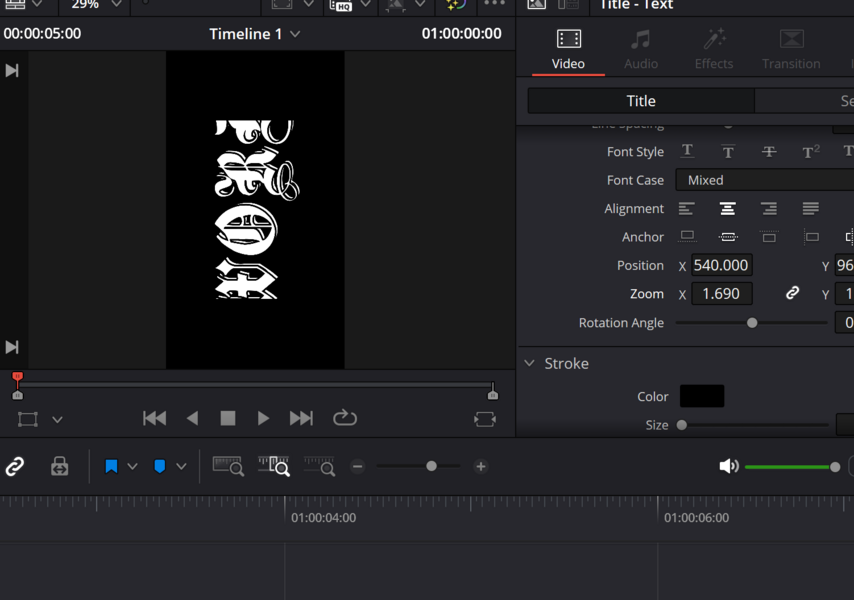
I am working with video in portrait mode (1080 x 1920), but I don't "think" that is the issue. I have tried several fonts and all of them produce the same results. You can see the image here. The text is the word "WORD", and as I scale it, it is cut off, or more correctly hidden under a black colored border.
Any Thoughts?
Is there some setting that I am missing?
Is there something special about certain fonts?
Thanks
AJ
I am following some tutorials, which lets you show video "through" large/fat text. The process is to put the large/fat text on the bottom layer, and video in the above layer(s); and then set the composite mode. There are several nice tutorials on YT.
PROBLEM: My font won't scale. As I scale the text; it seems like the text is covered by a black colored border, like a frame of sorts is covering it from scaling close or closer to the frame size.
I am working with video in portrait mode (1080 x 1920), but I don't "think" that is the issue. I have tried several fonts and all of them produce the same results. You can see the image here. The text is the word "WORD", and as I scale it, it is cut off, or more correctly hidden under a black colored border.
Any Thoughts?
Is there some setting that I am missing?
Is there something special about certain fonts?
Thanks
AJ