yrd
New Member
Hi everyone,
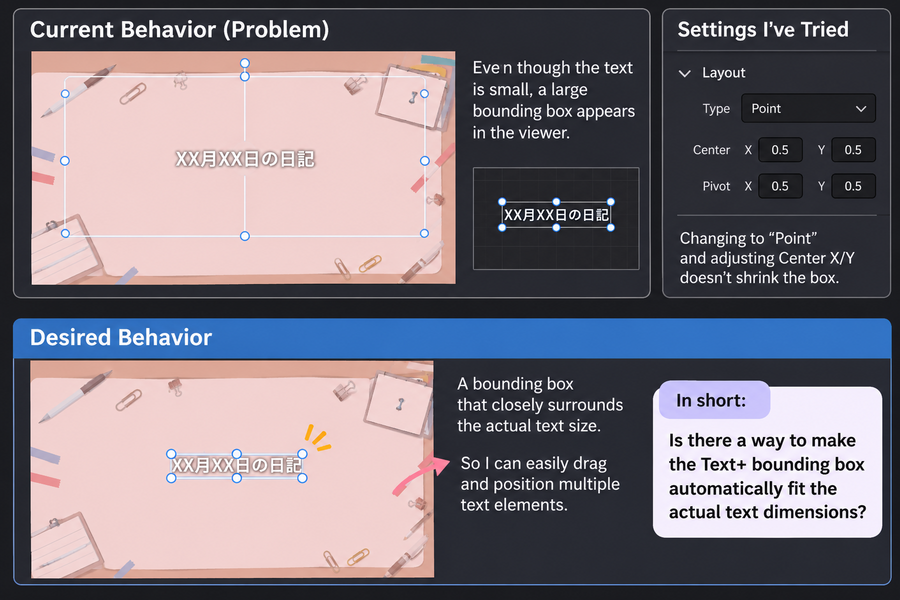
I'm using Text+ in DaVinci Resolve, and I have a question about the bounding box in the viewer.Currently, when I select a Text+ title, the white bounding box appears to cover a large area of the screen, even when the actual text is very small.
I've already tried changing the Layout Type from "Text Box" to "Point", but the bounding box rmains large. Adjusting the Center X/Y values doesn't seem to change its size either.
Is there a way to make the viewer's bounding box automatically fit the actual text dimensions?
I'd like to have a bounding box that closely surrounds the text, so I can easily drag and position multiple text elements, especially when arranging titles vertically or horizontally.
Having a large bounding box makes precise positioning quite difficult.
Is there a setting I'm missing, or is this simply a limitation of Text+?
I've attached a screenshot to illustrate the issue.
Thanks in advance!
* Image is generated by GPT.